
Roles
Product Designers
1 UX Researcher @ GitHub
My Role: Product Research and Design
Timeline
December 2025- June 2025
Project Deliverables
Ai Interaction Workflows
Competitor Study
Stakeholders
GitHub Next Research and Design Team
Ai design guidelines
Empowering Non-Technical Founders with AI No- Code Tools
In collaboration with the GitHub Next team, we set out to bridge the gap between unmet user needs across current AI tools and opportunity areas where Spark can evolve to deliver a more intuitive and empowering creation experience.
Customer Impact
80%
Faster Prototyping
5x
MVP Launches
60%
Higher User Confidence
Scoping our audience, we found early- stage startup team and founders with little to no technical background are most motivated to build digital products independently using AI tool
🟣 Non-Technical Users: 0–1 yrs coding exposure, no dev background
🔵 Technical Users: 3+ yrs coding experience, active/prior SWE roles

What problems do non technical founders face?
Non-technical founders face challenges in turning ideas into working products. Building functional prototypes often involves code dependency and steep learning curves, creating barriers to testing ideas and demonstrating concepts
What our user research uncovered...
Our first round of interviews revealed a growing demand for “vibe coding” tools: AI platforms that let non-technical users build intuitively through natural language and visual feedback.


"I don’t trust it [The tool and output] because i don’t understand the code."
"Customizing complex interactions for MVP or integrations quickly becomes difficult."
To understand non-technical users’ challenges, we compared their workflows with developers using competitor vibe coding tools.
We found that users with technical experience have control and clarity, while non-technical users seek the same visibility and guidance. Our design bridges this gap through clearer, more explainable AI interactions.

The Iteration Stage: Users build, test, and refine- is the main friction point in AI creation.
Non-technical users lose confidence early, facing unclear outputs and limited control, making iteration the biggest barrier to trust and progress.

The bridge to our solution...
Understanding the motivations and pain points of these early-stage, non-technical creators helped us define where Spark could truly make a difference — leading to two design principles that guided our solution and brainstorming
1. Personalized AI Interaction for non-technical users

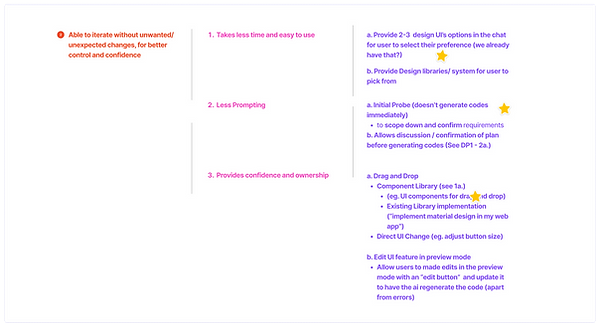
2. Able to iterate without unwanted/unexpected changes, for better control and confidence
Creating concepts
Building Low Fi Wireframes
We brought our principles to life through quick sketches and flows, testing how guided feedback, visual previews, drag-and-drop editing, and simple code explanations could make AI feel clearer, more conversational, and easier to build with for non-technical creators.


After finalizing and designing our concepts, we conducted task-based think-aloud usability tests followed by retrospective interviews with non-technical startup founders, which led us to...


Feature 1: Understand the Code
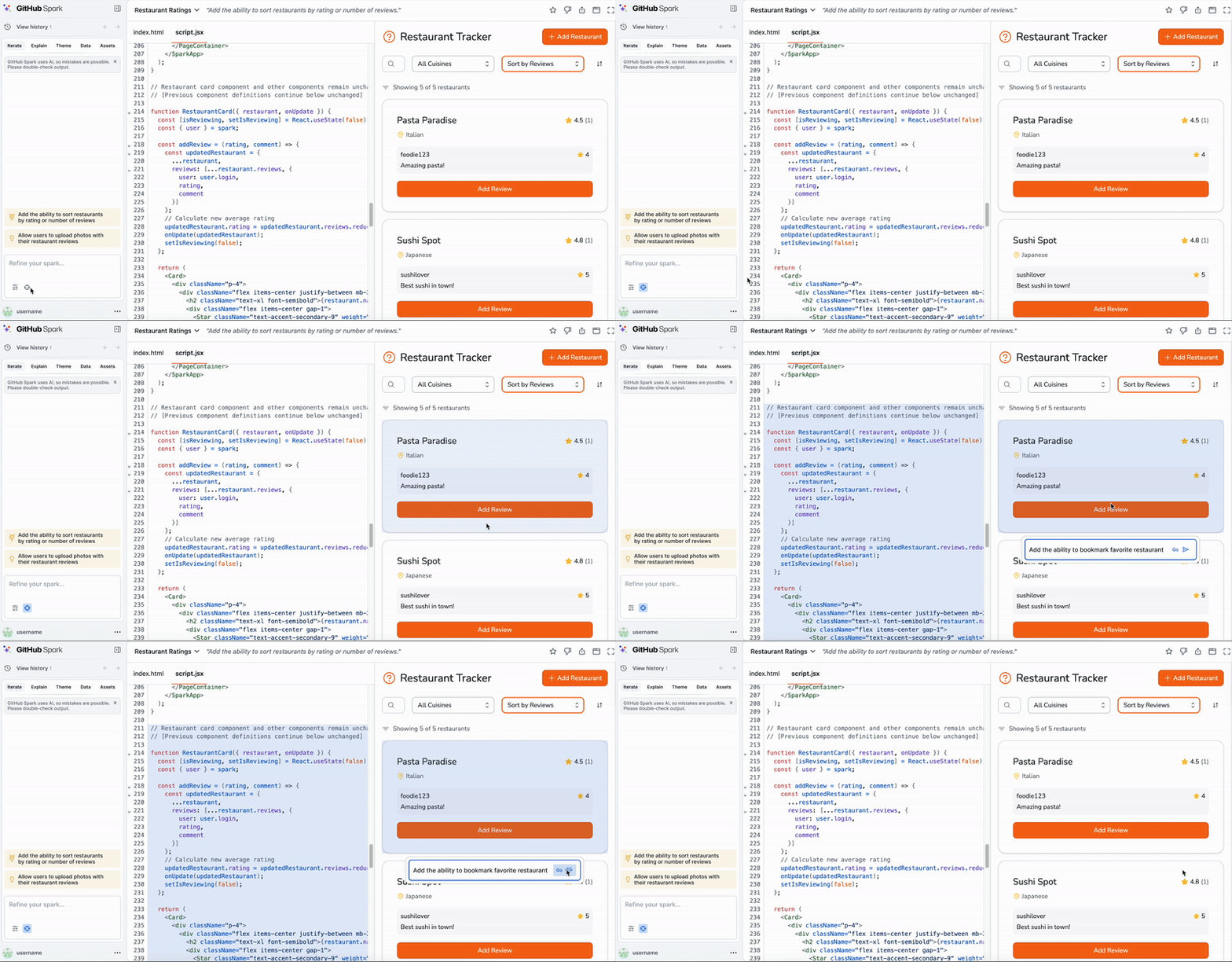
We designed this feature to give users clear control over edits, letting them click elements, view before-and-after changes, and revert easily using version history.


Feature 2: Intuitive Iteration
Gives users control to make targeted edits with clarity. Click elements, compare before/after code, and use History to switch versions
Feature 3: Interface Customization
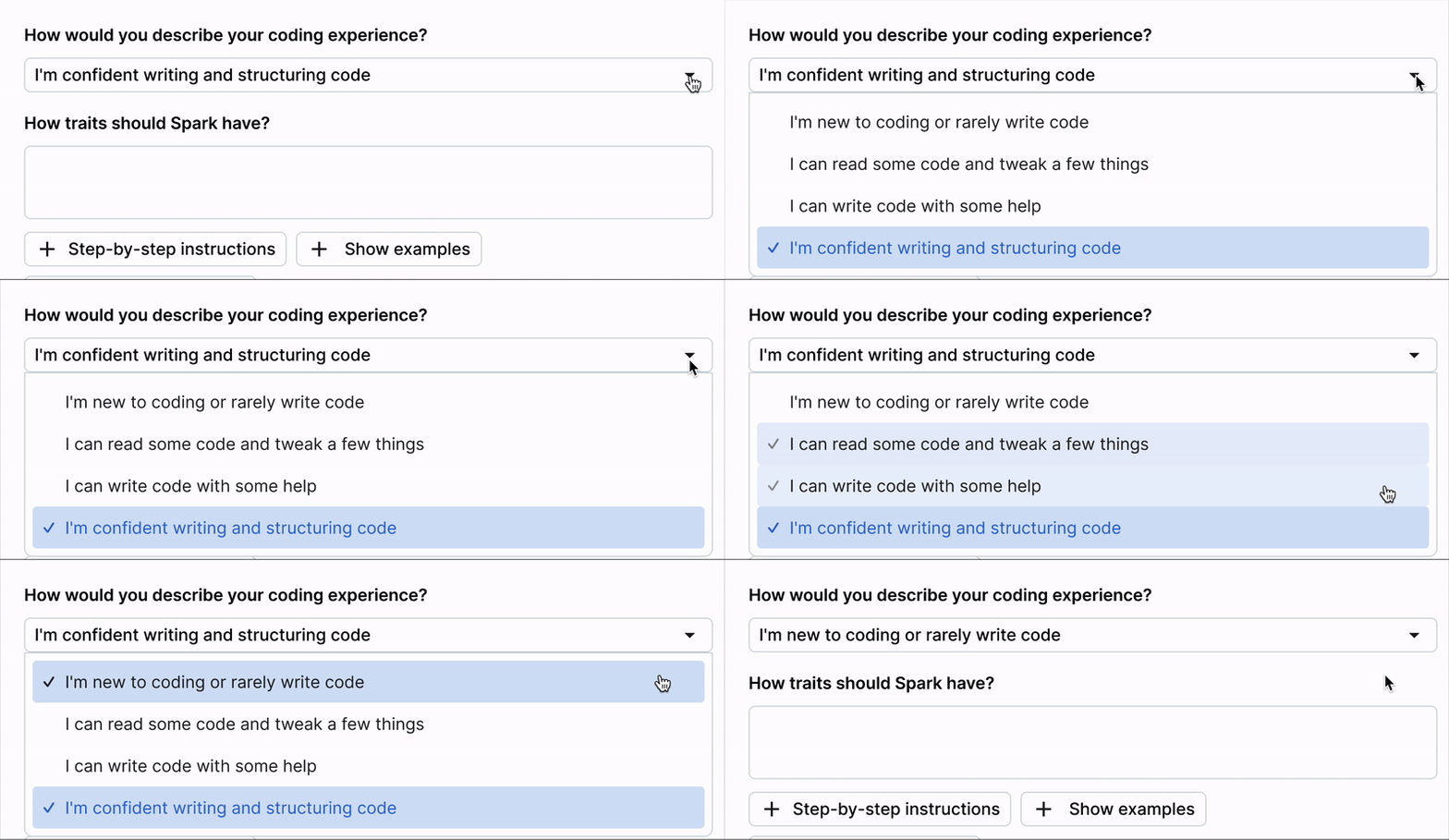
We designed this feature to let users set Spark’s tone and technical level, ensuring AI responses match their expertise and make complex workflows feel clearer and more inclusive.

Here are the future concepts and next steps our team explored and handed off to the Spark design and research team!

Limitations
Our usability testing couldn’t capture large-scale validation, which limited how precisely we could evaluate impact. Time constraints also prevented us from testing live AI interactions, so some findings remained conceptual.
Learnings
The project taught us to creatively simulate AI complexity through prototyping and storytelling. We saw that user trust comes not from perfect automation but from clarity, transparency, and giving people confidence and control throughout the experience.


Watch our demo and Interactive prototype below! (2 min watch)